


How to Segment your Unengaged and Engaged Subscribers.
For email campaigns to run successfully you want to focus on creating opportunities for your audience to engage with your campaigns. Using segmentation to separate your engaged and unengaged subscribers can empower you to actively focusing on engagement and unengaged subscribers.
SEGMENTING YOUR ENGAGED SUBSCRIBERS
Let's begin by identifying your engaged subscribers. To do this, follow these steps:
Navigate to your LIST. Click on LISTS again.
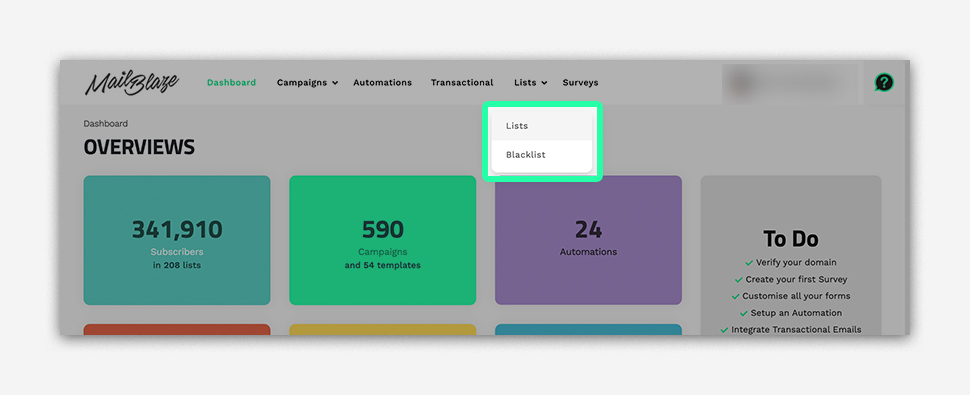
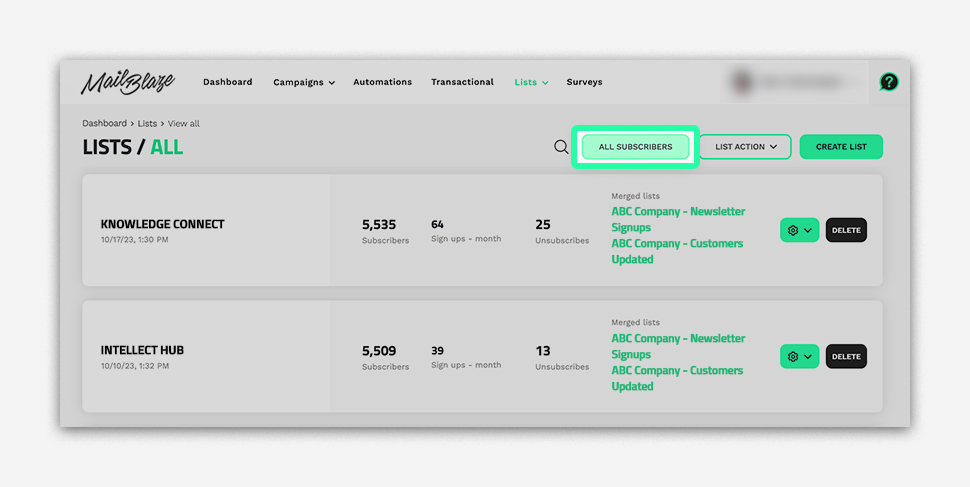
Now, click on ALL SUBSCRIBERS.
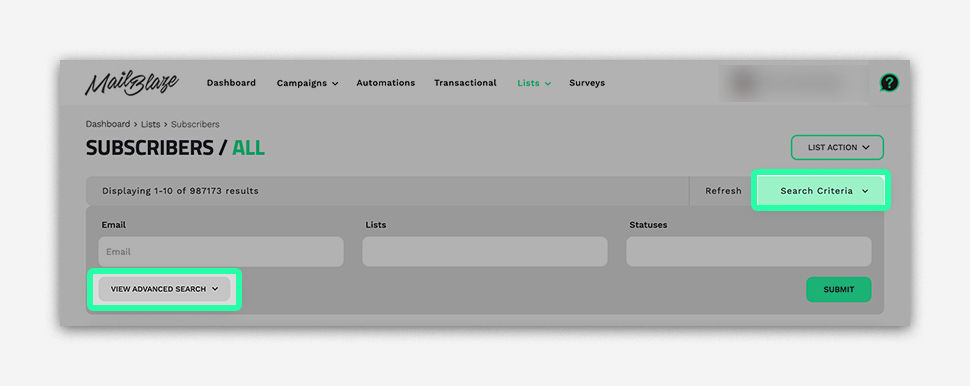
Select SEARCH CRITERIA Then click on VIEW ADVANCED SEARCH.
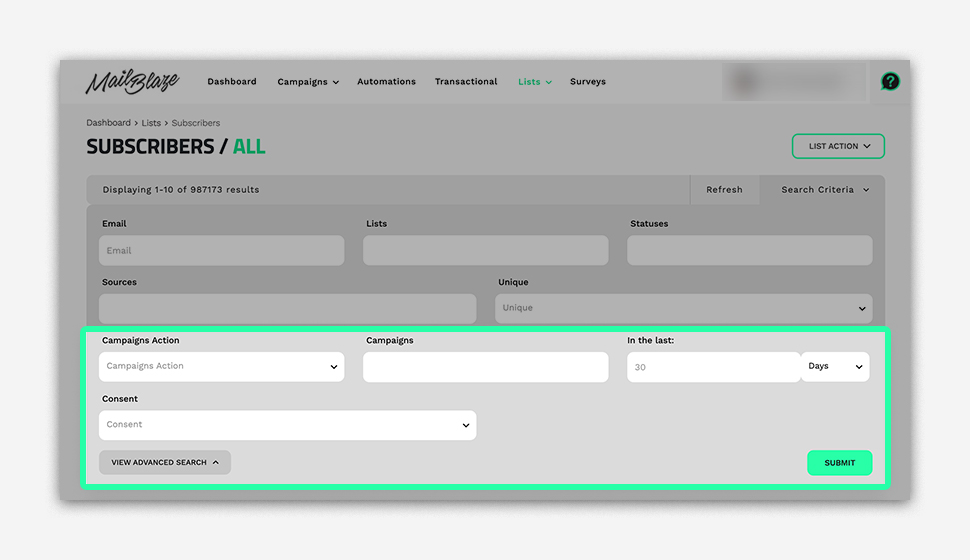
Under CAMPAIGN ACTION click on DID NOT OPEN. Now choose the specific campaign or leave it blank and set the query duration, for instance, 30 days, then click SUBMIT.
Once you've generated the data, follow these steps:
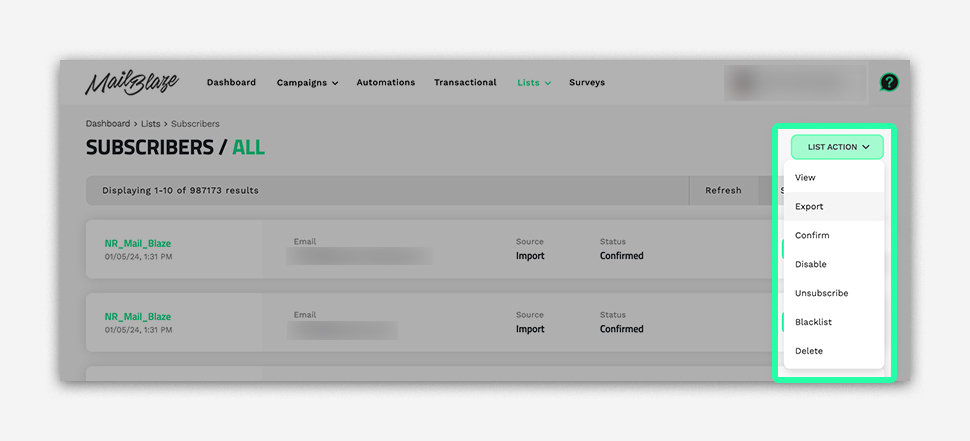
Click on LIST ACTION and then click on SELECT EXPORT.
Save the exported data to your local computer.
Next, create a new list as you typically would. For detailed guidance, you can refer to our video: How to Upload Your List You can repeat the same process for capturing further engagement data under DID CLICK.
Let’s name this list ENGAGED LIST. Going forward, you can use this segment to send your regular campaigns to engaged subscribers.
SEGMENTING YOUR UNENGAGED SUBSCRIBERS
Now, let's address the unengaged subscribers. To identify them, follow these steps:
Now, click on ALL SUBSCRIBERS.
Select SEARCH CRITERIA Then click on VIEW ADVANCED SEARCH.
Under CAMPAIGN ACTION click on DID NOT OPEN. This time, choose either Did Not Open or Did Not Click. You will need to export both sets of data, so you can choose the order that works best for you., then click SUBMIT.
Once the data is generated, follow these steps:
Click on LIST ACTION and then click on SELECT EXPORT.
Save the exported data to your local computer.
Create a new list for unengaged subscribers, naming it UNENGAGED LIST.
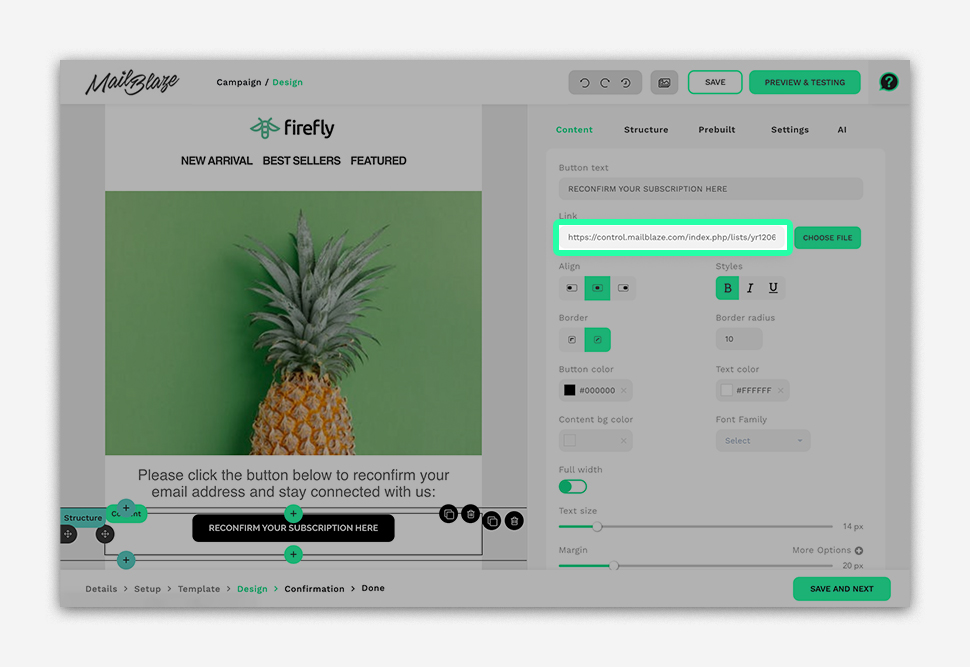
For this segment, it's crucial to craft an email encouraging them to reconfirm their subscription or update their contact details. In your campaign design, be sure to include the Subscription Form Link, which you can create as a button.
We will use the Subscription Form Link for the ENGAGED LIST, allowing subscribers to easily rejoin that list whenever they wish.
Now we’ll show you how you can easily copy the Subscription Form Link for the ENGAGED LIST.
Here's how:
Navigate to the LIST section and click on LISTS once more.
Locate and select the ENGAGED LIST. Click on FORMS AND EMAILS.
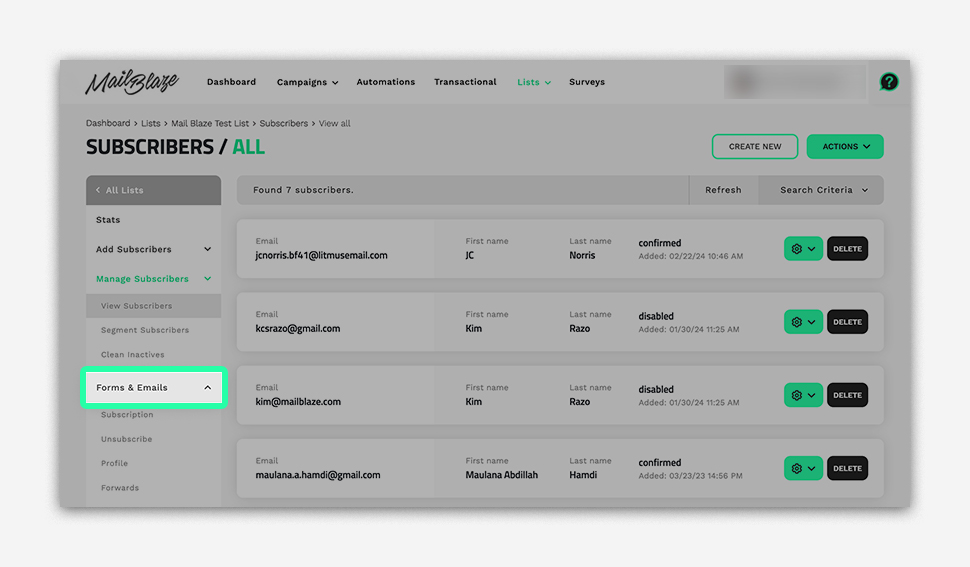
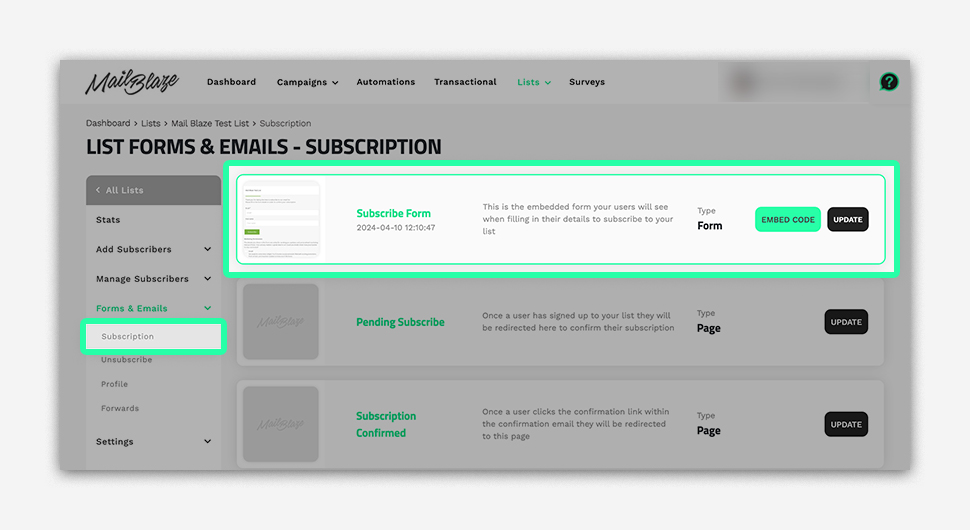
Choose SUBSCRIPTION and then click on SUBSCRIBE FORM.
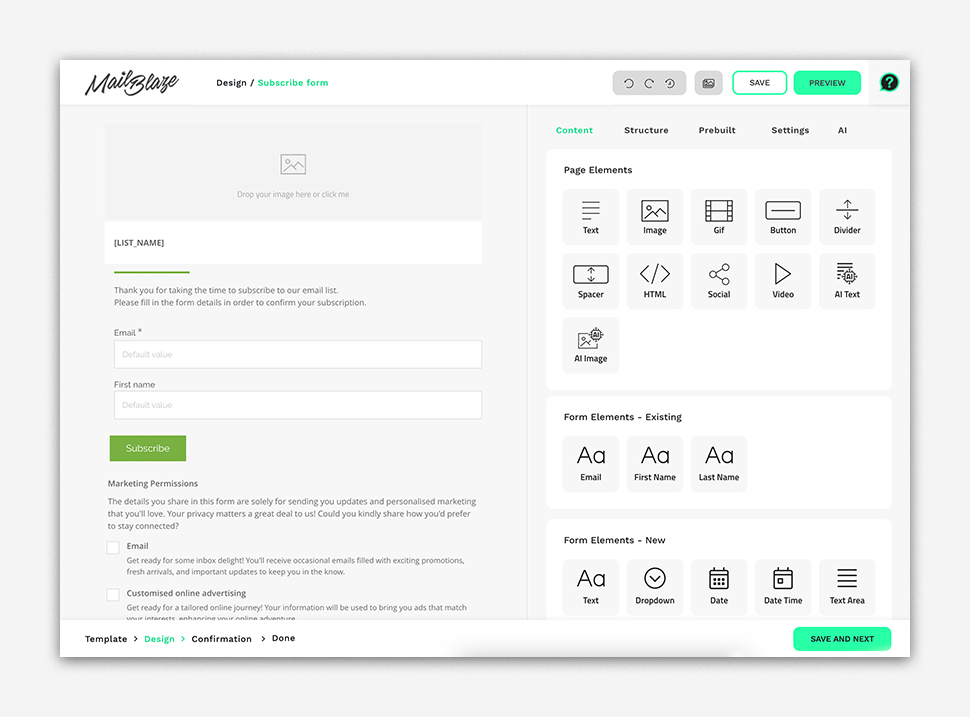
Customise the design as needed, and once you're satisfied, click on SAVE AND NEXT.
Copy the PUBLISHED URL and paste it into your notepad for safekeeping.
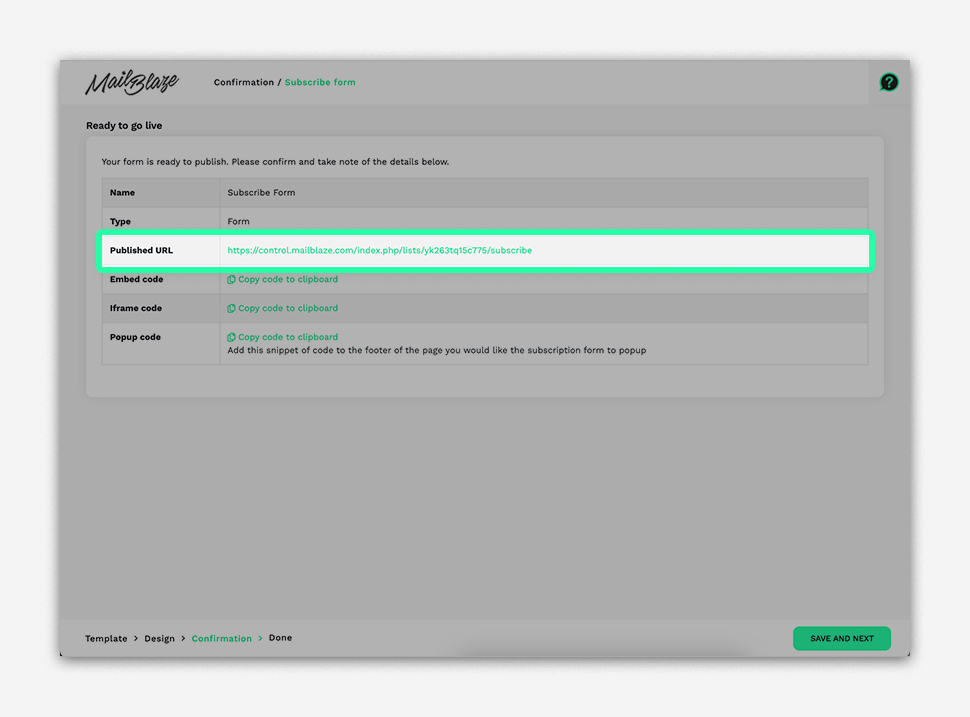
When you're prepared to create your reconfirmation email, simply retrieve the PUBLISHED URL from your notepad and insert it into your campaign design. You have the flexibility to use it as a hyperlink or as a button link, depending on your preferences.
When dealing with large email lists, avoid exporting the entire dataset over a long period like 30 days. It's best to reach out to us for assistance in verifying this. Segmenting your engaged and unengaged subscribers and sending reconfirmation opt-in emails is a simple process that significantly improves your email marketing effectiveness.
ENHANCING EMAIL ENGAGEMENT
In today's digital world, getting and keeping email subscribers' attention is tough. But with smart engagement tactics, you can amp up interaction levels and build stronger connections. Here are some effective strategies:
Personalisation
Personalising emails by addressing subscribers by name and tailoring content to their preferences boosts engagement. Use dynamic content like product recommendations or local offers to make emails feel personalized. Our video on adding custom fields or tags to your list can help with this. How To Add Custom Fields Or Tags To Your List
Segmentation:
Segment your email list into groups based on criteria like demographics or behavior. Sending targeted messages to each group, such as exclusive promos or re-engagement campaigns, makes content more relevant. You can watch How to Segment your List.
Compelling Subject Lines:
Craft attention-grabbing subject lines that evoke curiosity or offer clear benefits. Experiment with personalisation and urgency to stand out in crowded inboxes. Feel free to check out our article “Creating a Winning Subject Line” to improve your subject line strategy.
Engaging Content:
Make your emails informative and visually appealing with images, videos, and concise copy. Use compelling calls-to-action and interactive elements like polls to drive clicks and conversions. For further insights into engaging content, feel free to explore our article titled "Are You Really Engaging With Your Subscribers?"
Responsive Design:
Ensure your emails look good and are easy to read on mobile devices with responsive design. Check out our collection of customisable templates for mobile-friendly options HERE.
Interactive Elements:
Try clickable buttons, image carousels, and embedded forms to make emails more interactive and engaging. Explore our interactive content blocks for more ideas HERE.
To keep subscribers engaged, deliver personalized, relevant, and compelling content. By trying these tactics, you can boost engagement, build stronger connections, and meet your marketing goals. Experiment, analyze results, and optimize your campaigns for maximum success.