


CREATE
and get a response
The best-looking email is still worthless if it doesn't get a response. The Mail Blaze drag-and-drop builder gives you the creative control to build campaigns that reflect your brand and move your audience, without a line of code.
No credit card required · All features included
· A real person with you from day one
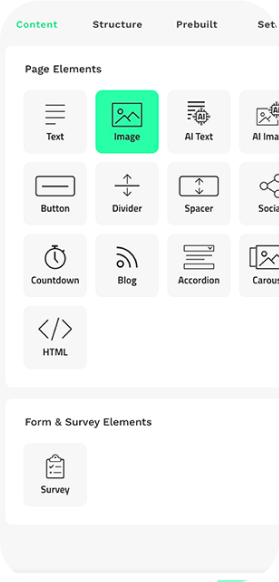
17 content blocks. Endless ways to arrange them.
Place a structure, pick your content block, fill it in. The drag-and-drop editor makes building campaigns straightforward without limiting what you can create. With 17 dedicated content blocks, you have the freedom to bring your ideas to life exactly as you imagined them.
Every block is designed to serve a purpose in the campaign: drawing the eye, driving a click, earning a response. Because a well-designed email isn't just one that looks good. It's one that gets opened, read, and acted on.
17 content blocks. Endless ways to arrange them.
Place a structure, pick your content block, fill it in. The drag-and-drop editor makes building campaigns straightforward without limiting what you can create. With 17 dedicated content blocks, you have the freedom to bring your ideas to life exactly as you imagined them.
Every block is designed to serve a purpose in the campaign: drawing the eye, driving a click, earning a response. Because a well-designed email isn't just one that looks good. It's one that gets opened, read, and acted on.
17 content blocks. Endless ways to arrange them.
Place a structure, pick your content block, fill it in. The drag-and-drop editor makes building campaigns straightforward without limiting what you can create. With 17 dedicated content blocks, you have the freedom to bring your ideas to life exactly as you imagined them.
Every block is designed to serve a purpose in the campaign: drawing the eye, driving a click, earning a response. Because a well-designed email isn't just one that looks good. It's one that gets opened, read, and acted on.
Build faster. Reuse what works.
Prebuilt structures give you ready-made design blocks to drop into your campaign, so you're not building from scratch every time. For campaigns you send regularly, save your own custom structures and pull them into any future campaign in seconds.
The prebuilt tab also lets you import previous campaigns directly into the editor. If something worked before, you don't have to rebuild it. You can start from a proven design and focus your energy on what's new: the message, the offer, the reason this send will drive engagement.
Build faster. Reuse what works.
Build faster. Reuse what works.
Prebuilt structures give you ready-made design blocks to drop into your campaign, so you're not building from scratch every time. For campaigns you send regularly, save your own custom structures and pull them into any future campaign in seconds.
The prebuilt tab also lets you import previous campaigns directly into the editor. If something worked before, you don't have to rebuild it. You can start from a proven design and focus your energy on what's new: the message, the offer, the reason this send will drive engagement.
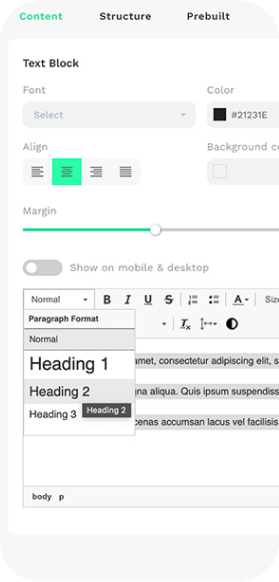
Set your brand once. Stay on brand every send.
The Settings Tab in the email builder lets you lock in your fonts, sizes, font weights, button styles, and colours so every campaign your team creates stays true to your brand without anyone having to check. No more second-guessing whether the right shade of blue is being used or whether the heading size matches the last send.
Brand consistency across every email builds familiarity. Familiarity builds trust. And trust is what your audience responds to.
Set your brand once. Stay on brand every send.
The Settings Tab in the email builder lets you lock in your fonts, sizes, font weights, button styles, and colours so every campaign your team creates stays true to your brand without anyone having to check. No more second-guessing whether the right shade of blue is being used or whether the heading size matches the last send.
Brand consistency across every email builds familiarity. Familiarity builds trust. And trust is what your audience responds to.
Set your brand once. Stay on brand every send.
The Settings Tab in the email builder lets you lock in your fonts, sizes, font weights, button styles, and colours so every campaign your team creates stays true to your brand without anyone having to check. No more second-guessing whether the right shade of blue is being used or whether the heading size matches the last send.
Brand consistency across every email builds familiarity. Familiarity builds trust. And trust is what your audience responds to.
Your images, your copy, created without leaving the builder.
Three tools are built directly into the editor to support your content creation process, so you spend less time switching between platforms and more time on what actually drives engagement.
Canva
Connect your Canva account and create campaign imagery directly inside Mail Blaze. Images you make are added straight to your media library, no downloading, saving, or re-uploading required.
Pexels
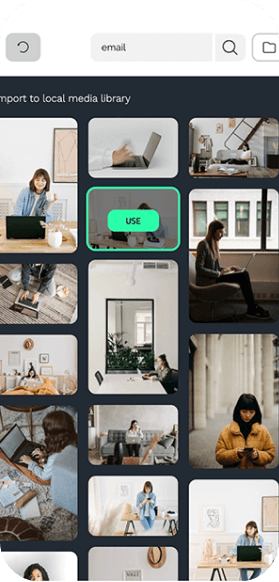
Search Pexels' library of free stock photography from your media library and add images directly to your campaign. No separate browser tab, no licensing headaches.
AI Content Blocks
Generate image and text content with built-in AI blocks. Start with a prompt, refine it, drop it in. Included on every plan.
Your images, your copy, created without leaving the builder.
Your images, your copy, created without leaving the builder.
Three tools are built directly into the editor to support your content creation process, so you spend less time switching between platforms and more time on what actually drives engagement.
Canva
Connect your Canva account and create campaign imagery directly inside Mail Blaze. Images you make are added straight to your media library, no downloading, saving, or re-uploading required.
Pexels
Search Pexels' library of free stock photography from your media library and add images directly to your campaign. No separate browser tab, no licensing headaches.
AI Content Blocks
Generate image and text content with built-in AI blocks. Start with a prompt, refine it, drop it in. Included on every plan.
Three interactive blocks that give your audience more to do.
Engagement isn't just about opens and clicks. Sometimes it's about giving your audience something to interact with inside the email itself. Mail Blaze includes three dedicated interactive content blocks to help you do that.
Accordion
Hide and reveal content sections, useful for longer emails where not every reader needs every detail. Keeps the email clean while still giving curious readers more.
Carousel
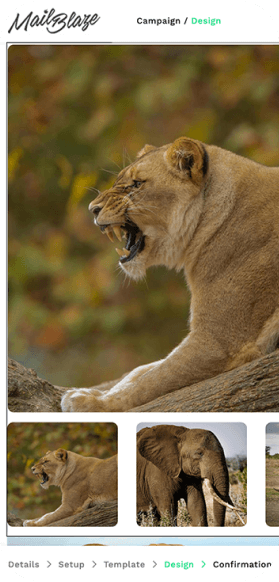
Cycle through multiple images in a single block, the way you would on a website. Good for product ranges, team introductions, or any send where variety earns attention.
Countdown Timer
Add urgency to a campaign with a live countdown to a date or deadline. Effective for launches, sales, and event registrations.
*Note: interactive features are not supported by all email clients. We recommend testing across inbox providers before sending.
Three interactive blocks that give your audience more to do.
Engagement isn't just about opens and clicks. Sometimes it's about giving your audience something to interact with inside the email itself. Mail Blaze includes three dedicated interactive content blocks to help you do that.
Accordion
Hide and reveal content sections, useful for longer emails where not every reader needs every detail. Keeps the email clean while still giving curious readers more.
Carousel
Cycle through multiple images in a single block, the way you would on a website. Good for product ranges, team introductions, or any send where variety earns attention.
Countdown Timer
Add urgency to a campaign with a live countdown to a date or deadline. Effective for launches, sales, and event registrations.
*Note: interactive features are not supported by all email clients. We recommend testing across inbox providers before sending.
Three interactive blocks that give your audience more to do.
Engagement isn't just about opens and clicks. Sometimes it's about giving your audience something to interact with inside the email itself. Mail Blaze includes three dedicated interactive content blocks to help you do that.
Accordion
Hide and reveal content sections, useful for longer emails where not every reader needs every detail. Keeps the email clean while still giving curious readers more.
Carousel
Cycle through multiple images in a single block, the way you would on a website. Good for product ranges, team introductions, or any send where variety earns attention.
Countdown Timer
Add urgency to a campaign with a live countdown to a date or deadline. Effective for launches, sales, and event registrations.
*Note: interactive features are not supported by all email clients. We recommend testing across inbox providers before sending.
Your social channels, connected to every campaign.
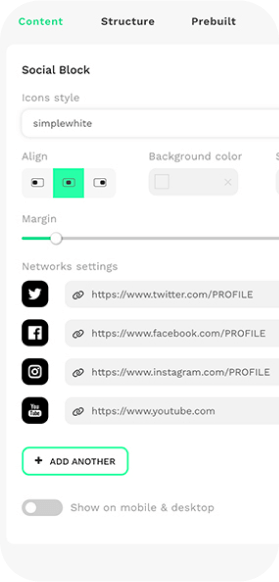
The social media content block lets you add your social icons to any email template quickly and in a style that fits your brand. Choose from a range of pre-designed icon groups to find the look that matches your campaign.
Every touchpoint that drives your audience from their inbox to your social channels is another opportunity to deepen the relationship. Email and social working together compounds the engagement over time.
Your social channels, connected to every campaign.
Your social channels, connected to every campaign.
The social media content block lets you add your social icons to any email template quickly and in a style that fits your brand. Choose from a range of pre-designed icon groups to find the look that matches your campaign.
Every touchpoint that drives your audience from their inbox to your social channels is another opportunity to deepen the relationship. Email and social working together compounds the engagement over time.
Are the emails mobile-responsive?
Yes. Every email created in the drag-and-drop builder is automatically mobile-responsive. You can preview how your design looks on desktop, tablet, and mobile before sending. That said, inbox providers like Gmail, Outlook, and Yahoo each have their own formatting rules, so we recommend testing across a few before you hit send.
Can I add my own custom fonts?
Yes. You can use web-safe fonts, Google Fonts, or upload your own custom fonts via the Settings Tab to keep your brand identity intact across every campaign. Not all inbox providers support every font, so where a font isn't supported, the closest available alternative is automatically applied.
Can I personalise emails with subscriber data?
Yes. Personalisation tags let you pull in subscriber data, like first name, last name, and any custom fields you've set up at list level, directly into your email content. A personalised email is a more relevant one. A more relevant email is a more engaged audience.
Can I save and reuse email designs?
Yes. You can save any email design as a template, save individual content blocks for reuse across campaigns, and import previous campaigns directly into the editor via the prebuilt tab. The less time you spend rebuilding, the more time you have to focus on what the campaign needs to say.
Do the interactive blocks work in all email clients?
Not all email clients support interactive content. The accordion, carousel, and countdown timer blocks work well in supported clients, but some providers, particularly older versions of Outlook, may render a fallback version. We recommend testing in your key inbox providers before sending campaigns that rely on these blocks.
Is the AI content tool included on all plans?
Yes. AI tools, including the image and text content blocks in the builder, are included on every Mail Blaze plan. They're not locked behind an upgrade. If you're on the free trial, you have access to them from day one.
Are the emails mobile-responsive?
Yes. Every email created in the drag-and-drop builder is automatically mobile-responsive. You can preview how your design looks on desktop, tablet, and mobile before sending. That said, inbox providers like Gmail, Outlook, and Yahoo each have their own formatting rules, so we recommend testing across a few before you hit send.
Can I add my own custom fonts?
Yes. You can use web-safe fonts, Google Fonts, or upload your own custom fonts via the Settings Tab to keep your brand identity intact across every campaign. Not all inbox providers support every font, so where a font isn't supported, the closest available alternative is automatically applied.
Can I personalise emails with subscriber data?
Yes. Personalisation tags let you pull in subscriber data, like first name, last name, and any custom fields you've set up at list level, directly into your email content. A personalised email is a more relevant one. A more relevant email is a more engaged audience.
Can I save and reuse email designs?
Yes. You can save any email design as a template, save individual content blocks for reuse across campaigns, and import previous campaigns directly into the editor via the prebuilt tab. The less time you spend rebuilding, the more time you have to focus on what the campaign needs to say.
Do the interactive blocks work in all email clients?
Not all email clients support interactive content. The accordion, carousel, and countdown timer blocks work well in supported clients, but some providers, particularly older versions of Outlook, may render a fallback version. We recommend testing in your key inbox providers before sending campaigns that rely on these blocks.
Is the AI content tool included on all plans?
Yes. AI tools, including the image and text content blocks in the builder, are included on every Mail Blaze plan. They're not locked behind an upgrade. If you're on the free trial, you have access to them from day one.
"There are not enough stars to give these guys!! I have been using MailBlaze for a few years now for multiple clients and I must say they are by far the best and most cost-friendly platform I have used for bulk mailing. Their support is outstanding, just a click away and you can chat to someone for help"
"There are not enough stars to give these guys!! I have been using MailBlaze for a few years now for multiple clients and I must say they are by far the best and most cost-friendly platform I have used for bulk mailing. Their support is outstanding, just a click away and you can chat to someone for help"
Ready to build emails that actually get a response?
Try the editor for free, or start your trial and get full access to the
builder alongside every other Mail Blaze feature.
No credit card required · All features included
· Real support from day one · 14 days free
Ready to build emails that actually get a response?
Ready to build emails that actually get a response?
Try the editor for free, or start your trial and get full access to the
builder alongside every other Mail Blaze feature.
Try the editor for free, or start your trial and get full access to the
builder alongside every other Mail Blaze feature.
No credit card required · All features included
· Real support from day one · 14 days free
Want to see it in action first?
Book a demo and we'll walk you through the builder and everything else
Mail Blaze can do for your team. No pitch deck, no pressure. Just a real
conversation about your goals.
Want to see it in action first?
Want to see it in action first?
Book a demo and we'll walk you through the builder and everything else
Mail Blaze can do for your team. No pitch deck, no pressure. Just a real
conversation about your goals.
Book a demo and we'll walk you through the builder and everything else
Mail Blaze can do for your team. No pitch deck, no pressure. Just a real
conversation about your goals.
2026 © Mail Blaze. All rights reserved.